创建一个项目
创建项目之前务必对 VSCode 提权!不然调用 powershell 创建的项目不知道在哪里。 网上有教程让用
Shell
npm create vue@latest创建项目,但这会导致 package.json 缺少 serve 参数导致项目无法启动,我不知道为什么。
基于 Vue-CLI 创建项目
后来采用 Vue CLI 创建项目,首先安装 CLI 模块,然后创建+启动项目即可。
Shell
npm install -g @vue/cli
vue create my-project //创建项目
npm run serve //启动项目
基于 Vite 创建项目(推荐)
原来 Vite 是换了启动命令==
shell
npm create vue@latest
cd //到项目目录下
npm install //安装依赖
npm run dev
项目结构
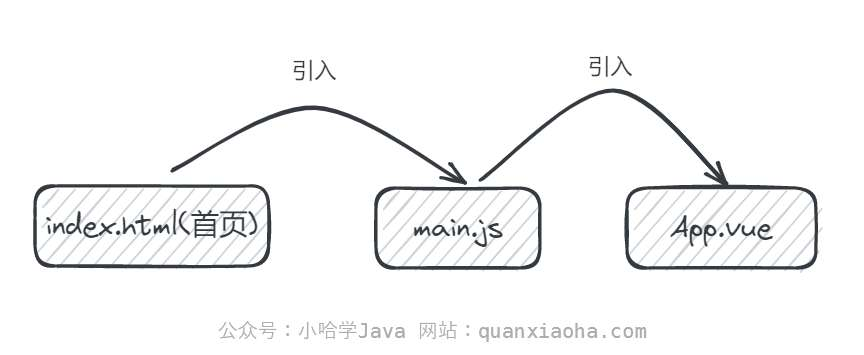 不管其他项目配置文件,其实 Vue 架构非常清晰:
- 首先看
index.html:
html
<!DOCTYPE html>
<html lang="">
  <head>
    <meta charset="utf-8">
    <meta http-equiv="X-UA-Compatible" content="IE=edge">
    <meta name="viewport" content="width=device-width,initial-scale=1.0">
    <link rel="icon" href="<%= BASE_URL %>favicon.ico">
    <title><%= htmlWebpackPlugin.options.title %></title>
  </head>
  <body>
    <noscript>
      <strong>We're sorry but <%= htmlWebpackPlugin.options.title %> doesn't work properly without JavaScript enabled. Please enable it to continue.</strong>
    </noscript>
    <div id="app"></div>
    <!-- built files will be auto injected -->
  </body>
</html>
最主要的就是创建了一个 id 为 app 的 div 元素,以便将 Vue 框架下实现的内容挂载到这个 div 上渲染。 这个 main.js 不需要被 index.html 引入,构建工具会实现这一点,将 main.js 作为入口点。 2. 然后看 main.js
js
import { createApp } from 'vue'
import App from './App.vue'

createApp(App).mount('#app')
这个脚本引入了 vue 模块中的 createApp 函数,为啥说这是个模块呢,cd 到项目目录下输入 npm list 可以得到当前项目的安装模块:
shell
test@0.1.0 D:\Code\Learn\js\test
├── @babel/core@7.24.4
├── @babel/eslint-parser@7.24.1
├── @vue/cli-plugin-babel@5.0.8
├── @vue/cli-plugin-eslint@5.0.8
├── @vue/cli-service@5.0.8
├── core-js@3.37.0
├── eslint-plugin-vue@8.7.1
├── eslint@7.32.0
└── vue@3.4.26
然后将 App.vue 作为一个 App 组件导入,并将其绑定到 html 中声明的 app 的 div 上,让 Vue 管理这个 DOM 下的所有子元素。 3. 最后是 App.vue
vue
<template>
  <h1>114514</h1>
</template>

<script>

</script>

<style>

</style>
Vue 的特点就是 html、js 和 css 可以放在一个文件里写,这样就可以通过 Vue 的框架渲染出 114514 了。
组件的导入与注册
在一个 Vue 文件中,可以引入其他的 Vue 组件,例如:
vue
<script lang="ts">
	<!--导入person,将其命名为per-->
    import per from './components/person.vue'
    export default {
        name : 'App',
        components: {
            per
        }
    }
</script>
这里的 components(组件) 是当前的导出组件的子组件,也就是在名为 App 的组件中添加了子组件 Per,这个名称是由导出对象的 name 属性决定的。 在 Vue 调试工具中查看组件层次: 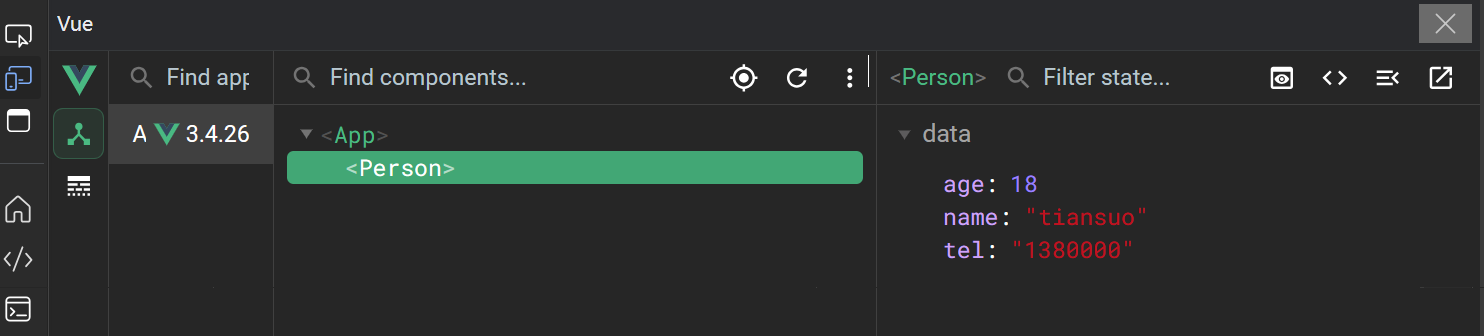 那个 App 是根组件,要在
 main.ts 里注册并绑定:
ts
import { VueElement, createApp } from 'vue'
import App from './App.vue'

createApp(App).mount('#app')