js
const express = require("express");
const bodyParser = require("body-parser");
const cors = require("cors");
const mysql = require("mysql2");

const app = express();

app.use(bodyParser.json());
app.use(cors());

// 创建 MySQL 连接
const connection = mysql.createConnection({
  host: "=== ===",
  user: "=== ===",
  password: "=== ===",
  database: "=== ===",
});

// 连接 MySQL 数据库
connection.connect((err) => {
  if (err) {
    console.error("Error connecting to MySQL database: " + err.stack);
    return;
  }
  console.log("Connected to MySQL database");
});

// 定义查询语句并返回结果
connection.query("select * from student su", (err, results, fields) => {
  if (err) throw err;
  // 定义POST请求的路由
  app.post("/api", (req, res) => { // 注意这是一个回调
    res.send(results);
  });

  // 定义POST请求的路由
  app.get("/api", (req, res) => {
    res.send(results);
  });

  // 启动服务器
  app.listen(3000, () => {
    console.log("Server started on port 3000");
  });
});

connection.end((err) => {
  if (err) {
    console.error("Error closing MySQL database connection: " + err.stack);
    return;
  }
  console.log("MySQL database connection closed");
});
执行流程
启动服务器为什么放在回调中? 在启动服务器之前,需要处理完所有的中间件和路由注册,然后再启动服务器监听相应端口上的请求,再路由到对应函数进行处理。 也就是说,只有当请求到来的时候,才会真正调用路由的回调函数(不包括这里的 connection,这是 mysql2 库实现的,与 express 无关,注意这里的 query 是异步的,执行完才会调用回调)。 实际上,在发起 GET 请求之前,启动 nodejs 的时候,这个 query 请求的结果 results 已经被存在内存中,并且保持引用不会被 GC,因此当服务器启动之后匹配相应路由依然可以访问到这个 results。
使用 sequalize 对象化操作数据库
仓库: https://gitee.com/yyt363045841/express.js-demo/tags ,
sequalize标签
Sequelize 允许开发者通过定义模型(Model)来映射数据库中的表。每个模型代表数据库中的一个表,模型的属性对应于表中的列。 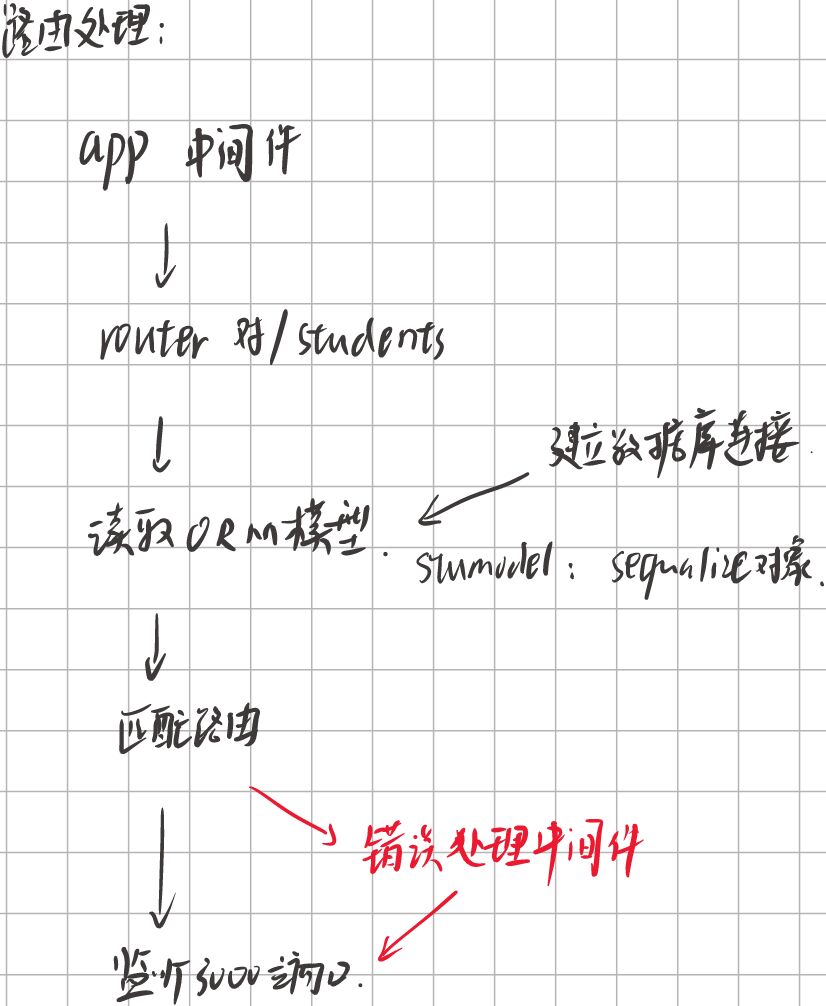 *应该是配置路由
建立连接
ts
import { Sequelize } from 'sequelize';

// 创建 Sequalize 实例并连接 MySQL 数据库
const DB: Sequelize = new Sequelize('user name', 'database name', 'password', {
    host: '=== ===',
    port: 3306,
    dialect: 'mysql',
    pool: {
        max: 5,
        min: 0,
        idle: 10000
    },
    logging: false
});

DB.authenticate().then(() => {
    console.log('数据库连接成功');
}).catch(err => {
    console.log('数据库连接失败', err);
});

module.exports = DB;
ORM 对象关系映射
js
const DB = require("../config/dbconfig"); // 导入数据库配置文件
const Sequelize = require("sequelize"); // 导入模块

// stu是数据库的表名
const stuModel = DB.define("student", {
    id: {
        primaryKey: true,
        type: Sequelize.INTEGER, // 数据类型改为INT
        field: "id",
        autoIncrement: true // 自增
    },
    name: {
        type: Sequelize.STRING(30), // 数据类型改为STRING(30)
        allowNull: false,
        defaultValue: '匿名', // 默认值为'匿名'
        field: "name"
    },
    pwd: {
        type: Sequelize.STRING(20), // 数据类型改为STRING(20)
        allowNull: false,
        defaultValue: '123456', // 默认值为'123456'
        field: "pwd"
    },
    sex: {
        type: Sequelize.STRING(2), // 数据类型改为STRING(2)
        allowNull: false,
        defaultValue: '女', // 默认值为'女'
        field: "sex"
    },
    birthday: {
        type: Sequelize.DATE, // 数据类型改为DATE
        defaultValue: null, // 默认值为null
        field: "birthday"
    },
    address: {
        type: Sequelize.STRING(100), // 数据类型改为STRING(100)
        defaultValue: null, // 默认值为null
        field: "address"
    },
    email: {
        type: Sequelize.STRING(50), // 数据类型改为STRING(50)
        defaultValue: null, // 默认值为null
        field: "email"
    }
}, {
    freezeTableName: true,
    timestamps: false
});

module.exports = stuModel;
通过 sequalize 进行 CURD 操作
js
const express = require('express');
const router = express.Router();
const stuModel = require('../models/stumodel');


// 获取所有学生信息:http://localhost:3000/student/search
router.get('/search', async (req, res, next) => {
  try {
    const result = await stuModel.findAll({ raw: true }); // 注意异步操作
    res.json({
      code: 1001,
      msg: result,
    });
  } catch (err) {
    next(err); // 传递给下一个错误中间件
  }
});

// 添加学生信息:http://localhost:3000/student/add
router.post('/add', async (req, res, next) => {
  try {
    const { id, name, age, gender } = req.body; // 解构学生信息
    const result = await stuModel.create({ id, name, age, gender });
    res.json({
      code: 1001,
      msg: '插入成功',
    });
  } catch (err) {
    next(err);
  }
});

// 删除学生信息:http://localhost:3000/student/delete
router.post('/delete', async (req, res, next) => {
  try {
    const { id } = req.body;
    await stuModel.destroy({ where: { id } });
    res.json({
      code: 1001,
      msg: '删除成功',
    });
  } catch (err) {
    next(err);
  }
});

// 更新某条信息:http://localhost:3000/student/update
router.put('/update', async (req, res, next) => {
  try {
    const { id, name, age, gender } = req.body;
    const user = await stuModel.findOne({ where: { id } });
    if (!user) {
      return res.json({
        code: 1002,
        msg: '查询失败',
      });
    }
    await user.update({ name, age, gender });
    res.json({
      code: 1001,
      msg: '更新成功',
    });
  } catch (err) {
    next(err);
  }
});

// 错误处理中间件
router.use((err, req, res, next) => {
  console.error(err);
  res.status(500).json({
    code: 1002,
    msg: '服务器发生错误',
  });
});

module.exports = router;
通过 Express-Validator 对 Body 进行数据合法校验
Express-Validator 是一个用于 Express.js 框架的中间件,它提供了一套简单易用的验证功能,用于验证 HTTP 请求中的数据(如查询参数、请求体、请求头等)。通过使用 Express-Validator,开发者可以在处理请求之前对输入数据进行验证,从而确保数据的合法性和安全性。
js
const { body, validationResult } = require("express-validator");

router.post(
  "/add",
  [
    //配置验证规则
    body("name")
      .notEmpty()
      .withMessage("用户名不能为空!")
      .custom(async (username) => {
        const user = await User.findOne({ username });
        if (user) return Promise.reject("用户名已存在");
      }),
    body("age").notEmpty().withMessage("年龄不能为空!"),
    body("sex")
      .notEmpty()
      .withMessage("性别不能为空!"),
    body("email")
      .isEmail()
      .withMessage("邮箱格式不正确!")
      .bail()
      .custom(async (email) => {
        const user = await User.findOne({ email });
        if (user) return Promise.reject("邮箱已经存在");
      }),
  ],
  async (req, res, next) => {
    const errors = validationResult(req);

    if (!errors.isEmpty()) {
      return res.status(400).json({
        errors: errors.array(),
      });
    }
    next();

    try {
      const { id, name, age, gender } = req.body;
      const result = await stuModel.create({ id, name, age, gender });
      res.json({
        code: 1001,
        msg: "插入成功",
      });
    } catch (err) {
      next(err);
    }
  }
);
SSR
简单返回 html 字符串实现 SSR
js
app.get("/", (req, res) => {
  fs.readFile('view/index.html', (err, data) => {
    if (err) {
      res.status(500).send("服务器内部错误");
    } else {
      res.type('html').send(data);
    }
  });
});
模板引擎实现 SSR
js
app.set('view engine', 'pug');
app.set('views', './view');- PUG
js
app.get('/', (req, res) => {
  res.render('index', {
      pageTitle: 'User List',
      message: 'Hello, this is a list of users:',
      users: [
          { name: 'Alice' },
          { name: 'Bob' },
          { name: 'Charlie' }
      ]
  });
});- EJS